Cal.com Appointment Booking form(Iframe)
When a Cal.com form is embedded on your website (often via iframe), Google Tag Manager cannot track submissions by default because iframe events are isolated from the main page.
To track form submissions properly, you can use a custom JavaScript listener that detects the Cal.com booking confirmation and pushes an event to the dataLayer.
This allows you to fire tracking tags in GA4, Meta Pixel, or any other analytics platform when a booking is successfully completed.
Step 1: Install the cal.com form listener code
Add the following script to your site through GTM or directly in your page code.
This script listens for Cal.com booking confirmation events and pushes them to the dataLayer.
<script>
var config = { dataLayerEventName: 'cal_submission_success' };

if (Cal) {
  var handler = {
    action: "bookingSuccessfulV2",
    callback: function (e) {
      fetch("https://api.cal.com/v2/bookings/" + e.detail.data.uid)
        .then(function (r) { return r.json(); })
        .then(function (d) { pushDL(d.data); });
    }
  };

  if (Cal.ns && Object.keys(Cal.ns).length) {
    for (var k in Cal.ns) Cal.ns[k]("on", handler);
  } else {
    Cal("on", handler);
  }
}

function pushDL(d) {
  window.dataLayer = window.dataLayer || [];

  var name = (d.responses && d.responses.name || "").split(" ");

  dataLayer.push({
    event: config.dataLayerEventName,
    user_data: {
      email_address: d.responses.email,
      phone_number: d.responses.attendeePhoneNumber,
      first_name: name.shift() || "",
      last_name: name.join(" ")
    }
  });
}
</script>
Step 2: Create a new Custom HTML Tag in GTM
Go to Tags → New → Custom HTML
Paste the above script inside
Set the trigger to “All Pages,” or preferably only on pages that contain the cal booking form.
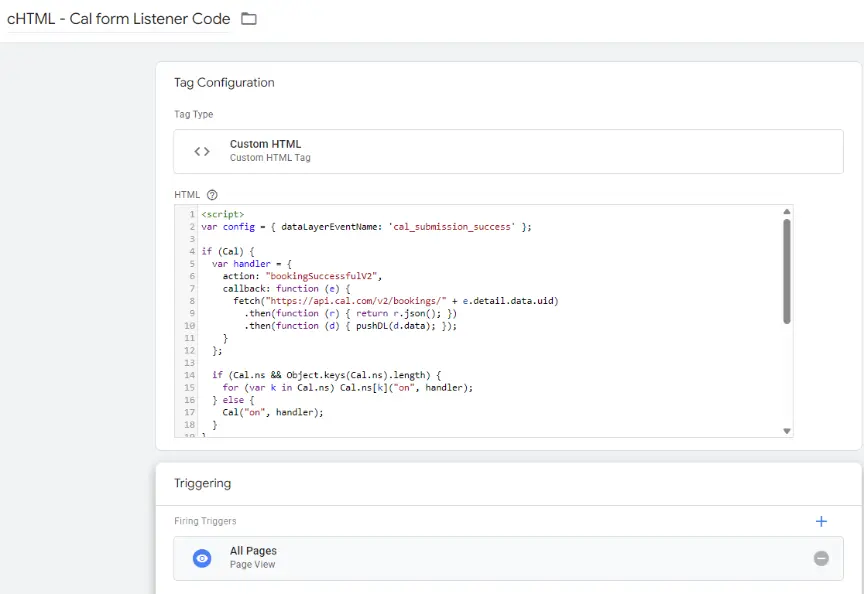
I recommend triggering this tag only on pages that contain the Cal form.
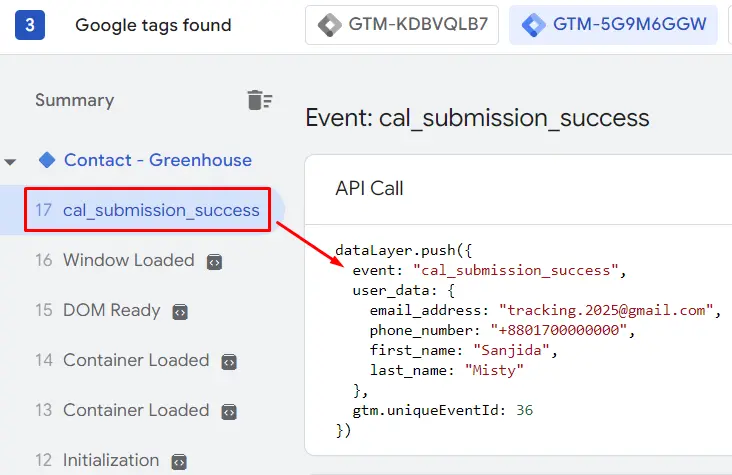
This confirms the custom event is firing successfully in GTM preview mode.
Step 3: Create dataLayers Variables
User data
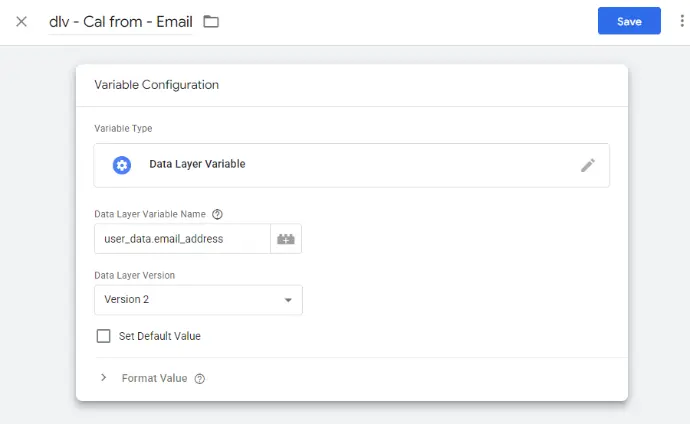
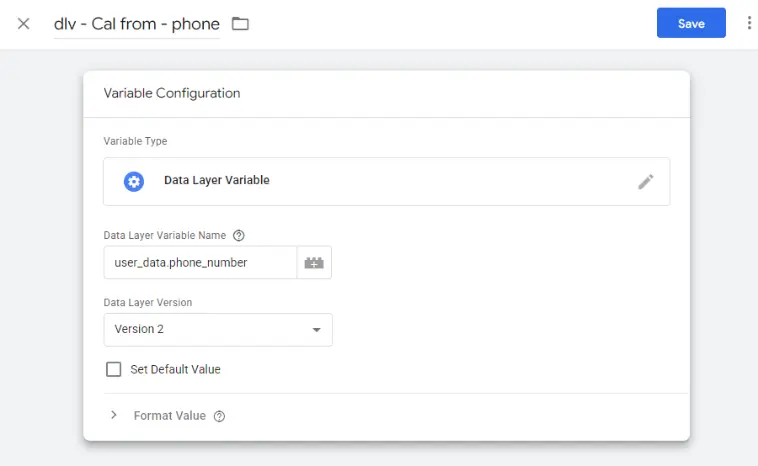
These variables let you capture and send the user information from your Cal form submissions to your advertising platforms.
Step 4: Send Data to GA4, Google Ads, or other platforms
You can now use the event cal_submission_success to fire your GA4 conversion event, Meta Pixel lead, or other platform tags.
This setup ensures consistent form tracking, even for Cal forms embedded via iframe.
By using this listener script with GTM, you bridge the tracking gap caused by Cal iframes.
You’ll get more reliable conversion data, deeper user insights, and better campaign optimization across all platforms.
"Have questions or need help setting up your tracking? Feel free to reach out, I’m happy to help!"
Sanjida Islam Misty
Web Analytics & Tracking Specialist